Migrate from Sage 50, Sage 200 or older Sage systems to Microsoft Dynamics 365 Business Central. Clean data. Reconciled balances. A clear plan before you start.
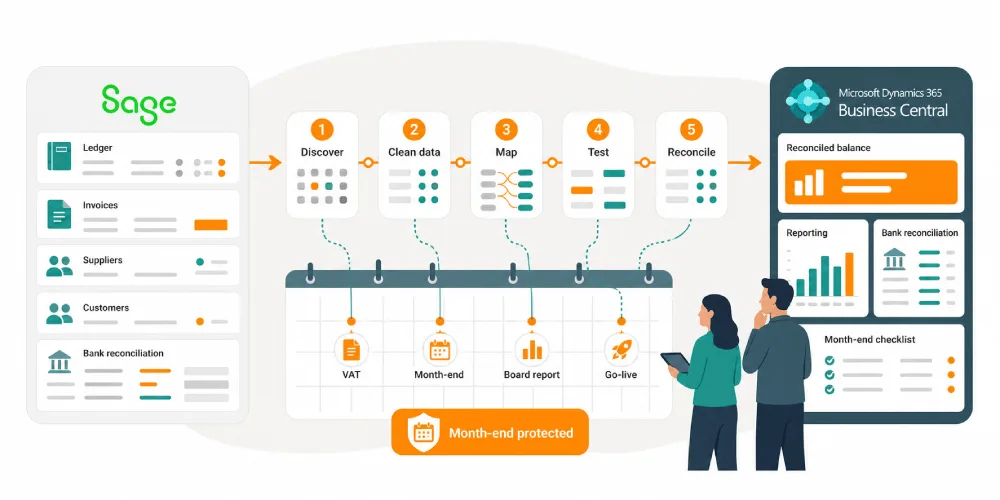
A Sage to Business Central migration moves the right data into Microsoft Dynamics 365 Business Central, then proves the numbers through testing and reconciliation before finance signs off go-live.
The difficulty is not learning a new system. The risk is losing trust in the numbers while VAT, bank recs, payroll handoffs, board reporting, supplier payments and month-end still have to happen.
Sage has served your business well
But if month-end now depends on spreadsheets, reports need manual checking and your team spends too much time rekeying or reconciling data, it may be time to move on.

We help UK businesses move from Sage to Microsoft Dynamics 365 Business Central with clean finance data, controlled costs and a migration plan built around your reporting calendar.
We make sure it’s not a vague “digital transformation” project, but a practical migration plan, clean data, tested processes and a fixed scope agreed before work begins.
Is Sage starting to hold you back?
Finance teams usually think they’ve outgrown Sage 50 or Sage 200 when their system still records transactions, but month-end becomes a nightmare.
You may be seeing the signs.
- Reports need exporting and fixing in Excel
- Your chart of accounts has grown messy
- Stock, sales, purchasing and finance do not join up cleanly
- You’re relying on workarounds which your team no longer question
- Sage support, upgrades or add-ons are becoming harder to justify
- You want better reporting, but you don’t trust the data underneath it
That is the point where Sage stops being “the system” and starts becoming another thing to manage.
When moving from Sage isn’t the best choice
Business Central is powerful, but it is not necessarily the right answer for every Sage user. We’d rather tell you than sell you a system you don’t need.
A move to Business Central may not be right if:
- Sage still gives reliable numbers.
- Month-end is manageable.
- Finance processes are simple.
- The team only needs basic bookkeeping.
- Nobody has time to test, clean data, or make decisions.
- The budget covers licences, but not migration, training, reporting, and support.
Sometimes the right next step is not a migration. It might be cleaning up your data, fixing a reporting process, reviewing your Sage setup, or planning for a move in six or twelve months.
That is still useful work and the point is to make the right decision, not the fastest one.
What data moves from Sage into Dynamics 365 Business Central?
The important thing is to make sure the right data moves to the right place and balances afterwards.
We can help migrate:
- Customers
- Suppliers
- Products and stock items
- Nominal codes and chart of accounts
- Opening balances
- Transaction history, where required
- Sales and purchase history
- Bank and VAT information
- Dimensions, departments, cost centres and reporting structures
- Reports and finance processes
Before anything goes live, we reconcile the migrated data against Sage so you can check the numbers yourself.
Your finance team keeps working during the move
The biggest fear with moving from Sage is not the software.
It is disruption.
You still need to close month-end. You still need to file VAT. You still need to answer the board when they ask for numbers.
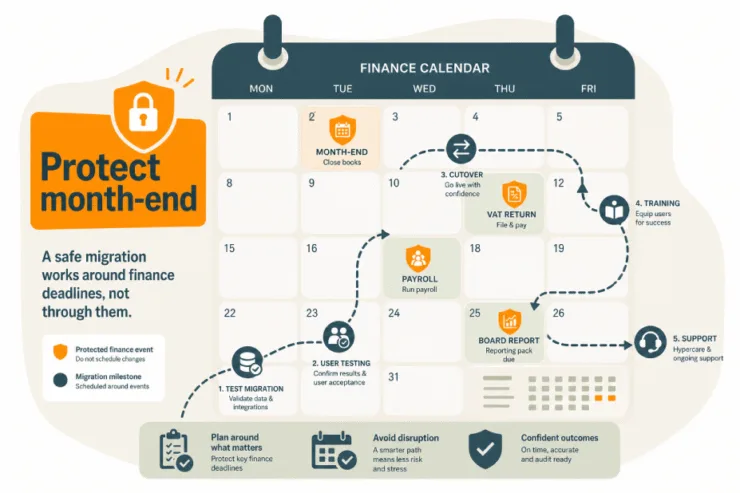
So we plan the migration around your finance calendar.
That may include:
- A test migration before go-live
- Parallel running where it makes sense
- A controlled cutover date
- User testing with your real Sage data
- Training before your team has to use the new system
- Post-go-live support while everyone settles in
Our goal is simple. You move to Business Central without finance losing control.
How long does a Sage migration take?
Project lengths do vary a lot, the main factors are
- Volume and history of data. How many years of historical data and how many transactions you migrate .
- Data quality. Duplicates, incomplete records and inconsistencies all need cleansing before migration.
- Level of customisation and complexity. Whether you need an out-of-the-box setup or bespoke configuration, plus the number of modules in use (stock, manufacturing, multi-currency, projects, etc.).
- Third-party integrations. Systems such as e-commerce, CRM, EDI, payroll or reporting tools.
- Your internal team’s availability – The speed of decision-making, engagement in workshops, and time for testing and sign-off (UAT) directly affects how quickly the project can progress.
Simple Sage 50 migration
3 to 6 weeks
A small business with clean data. Open balances only, no long history. Standard finance, no integrations, out-of-the-box Business Central. Minimal fuss, quick go-live.
Standard SME migration
6 to 12 weeks
Some history comes across. A moderate number of customers, suppliers and items. A couple of modules like stock and multi-currency. One simple integration, maybe Power BI. Proper testing and training built in.
Complex Sage 200 migration
3 to 6 months
Several years of transactional history. Multiple modules such as stock, manufacturing or projects. Data cleansing needed. Two or three integrations like e-commerce and CRM. Some process redesign and customisation along the way.
Multi-entity migration
6 to 12+ months
Multiple companies. Multi-site or multi-currency. Large data volumes, significant customisation, several integrations, and phased go-lives timed around year-end. Heavy testing and training across a lot of users.
A sample plan may look like this:
- Week 1 to 2: Discovery and scope
- Week 3 to 4: Data review and migration planning
- Week 5 to 7: Business Central setup and test migration
- Week 8 to 9: User testing and finance checks
- Week 10: Go-live planning
- Week 11 onward: Go-live and first month-end support
Sage vs Business Central: what changes?
| How it is using Sage today | What changes with Business Central |
| Reports need exporting to Excel before you trust them | Reporting is built around live finance and operational data |
| Month-end depends on manual checks and reconciliations | More of the process happen inside one connected system |
| Finance, sales, stock or operations sit in separate systems | Business Central brings finance and operations together |
| Your chart of accounts, departments or cost centres have grown messy | You can redesign the structure as part of the move |
| Add-ons and workarounds fill gaps in Sage | Business Central can be configured around your actual processes |
| Access may depend on servers, remote desktops or office-based processes | Business Central is cloud-based and works with Microsoft 365 |
| Growth means more entities, locations, users or reporting demands | Business Central is built for more complex finance and operations |
| You know Sage well, but it is becoming harder to stretch | Business Central gives you a wider platform, but needs proper planning |
What Business Central gives you that Sage cannot
Business Central gives you a more joined-up finance and operations system
- Better financial reporting
- Fewer spreadsheet workarounds
- Cleaner approval processes
- Stronger stock, purchasing and sales visibility
- Easier multi-company reporting
- Out of the box connection with Microsoft 365
- Cloud access without maintaining servers
- A system that can grow beyond basic accounts
Business Central isn’t automatically right for everyone. Part of our review is checking whether the move makes sense for your business, your data and your team. If it doesn’t, we will say so.
What’s the impact of moving to Business Central?
Forrester’s analysis of five Microsoft customers in the US The Total Economic Impact™ of Business Central found that Business Central helped them to improve operational efficiency, avoid costs and easily scale their deployments.
The report based on a composite organisation showed organisations implementing Business Central achieved a projected 209% ROI over three years, with a net present value of $464,000 and a payback period of under six months.

Source: Forrester – The Total Economic Impact™ Of Microsoft Dynamics 365 Business Central
Business Central in more depth
What a Sage to Business Central migration costs
Licences are only one part of the cost. You’ll want to know what the whole move will cost, including data migration, configuration, training, testing and support.
Small
From around £10,000 to £20,000
Best for a straightforward Sage 50 move.
Medium
From around £15,000 to £50,000
Best for a growing SME.
Large
From around £50,000 to £150,000+
Best for complex or multi-company operations.
What factors affects cost?
- Number of users
- Sage version
- Number of companies/entities
- Data history required
- Reports neded
- Integrations
- Custom workflows
- Training needs
What is included
- Discovery
- Data mapping
- Test migration
- User acceptance testing
- Finance reporting setup
- Go-live support
- Post-go-live support
What is not included as default
- Microsoft licences
- Third-party apps
- Heavy custom development
- Complex integrations
- Historical data beyond agreed scope
“We hadn’t outgrown the business, we’d outgrown Sage 50. Moving to Business Central gave us clearer stock, cleaner reporting and easier access for the team.”
Distribution company, £8m turnover, 12 users
The business relied heavily on spreadsheets for stock control and reporting because Sage 50 struggled to support multiple users and give the team clear visibility across the company.
Remote access through VPN was slow, which made it harder for users to work away from the office.
We moved the business from Sage 50 to Microsoft Dynamics 365 Business Central, bringing stock and financial data into one system and reducing the team’s reliance on spreadsheets.
We also gave all users secure browser-based access, removing the VPN issues and giving the finance team cleaner reporting, better visibility and a system better suited to a growing distribution business.
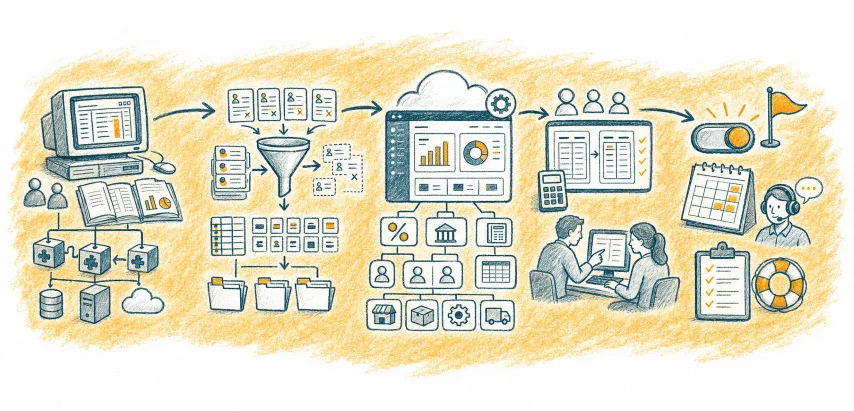
How the Sage to Business Central migration works
We review your current Sage setup
We look at how you use Sage today, including your finance processes, data, reports, users, add-ons and any connected systems.
Mapping Sage to Business Central
We identify where your Sage data and processes will sit in Business Central, and where your current workarounds can be replaced.
Cleaning and preparing the data
Old data, duplicate records and messy codes can cause problems if they are moved without thought. We help tidy what needs tidying before migration.
Configure Business Central
Set up finance, VAT, bank accounts, posting groups, dimensions, users, permissions, and any operational areas in scope.
Run a test migration
Put real Sage data into a test Business Central environment before go-live.
Test with real users
Finance users should test the work they actually do, not a generic script that avoids hard cases.
We reconcile the numbers
Opening balances, key records and agreed data are checked against Sage so you can be confident the system balances.
We train your team
Your team learns the system they will actually use, with your processes and your data.
Plan cutover
Agree the final Sage transaction date, final data extract, go-live date, fallback plan, and support rota.
Support go-live and first month-end
The first month-end is where gaps appear. Support needs to be ready before that happens.
What can go wrong?
| Migration risk | What can happen | How to prevent it |
| Poorly cleaned data | Duplicate customers, old suppliers, messy item records, and incorrect balances move from Sage into Business Central. | Run a data review before migration. Clean inactive records, agree naming rules, remove duplicates, and test the migrated data before go-live. |
| Weak chart of accounts planning | The business copies old nominal code problems into Business Central and still cannot report cleanly by department, cost centre, project, or entity. | Review the chart of accounts, dimensions, departments, cost centres, and reporting structure before setup starts. Do not rebuild old workarounds without questioning them. |
| No finance sign-off before go-live | Finance loses confidence because opening balances, aged debtors, aged creditors, VAT, bank, and stock values have not been proved properly. | Use a formal finance sign-off checklist. Reconcile trial balance, opening balances, VAT, bank, aged debtors, aged creditors, and stock valuation before cutover. |
| Over-customising too early | The project becomes more expensive, takes longer, and recreates old Sage workarounds before the team understands standard Business Central. | Test standard Business Central first. Only customise where there is a clear business case, named process owner, and agreed cost impact. |
| Underestimating reporting requirements | Month-end still depends on Excel because the board pack, management accounts, margin reports, or stock reports were not scoped properly. | List core reports during discovery. Define who uses each report, what decisions it supports, what data it needs, and when it must be ready. |
| Training users too late | Users panic after go-live, revert to spreadsheets, or ask finance and operations leaders to fix basic process questions under pressure. | Train users before cutover using real business processes and real examples. Include purchase invoices, sales orders, stock movements, approvals, reporting, and month-end tasks. |
| Going live too close to month-end | Finance has to learn a new system while closing the books, filing VAT, answering board questions, or handling payroll and supplier payments. | Plan cutover around the finance calendar. Avoid month-end, VAT deadlines, payroll dates, audit work, and board reporting periods where possible. |
Why work with us?
We are a UK-based Microsoft Dynamics 365 consultancy, based in Yorkshire.
We work with small and medium-sized businesses that have outgrown messy, disconnected or ageing systems.
Our difference is simple.
- You deal with the same people from planning through to support. No big handover. No sales team promising one thing and a delivery team discovering another.
- We take time to understand what is really going on before we recommend anything.
- And if Business Central is not right for you, we will tell you.

Is this right for you?
A Sage to Business Central migration may be worth exploring if:
- You have outgrown Sage 50 or Sage 200
- Finance reporting takes too long
- You are using Excel to fill gaps in Sage
- You need better stock, project, service or operational visibility
- You want finance, sales, purchasing and operations in one system
- You are facing a Sage upgrade or support decision
- You need more confidence in your numbers
If you recognise three or more of these, it is probably worth a conversation.
Or call us on 01422 824831 or email hello@allmysystems.co.uk
FAQs
Most Sage to Business Central migrations take several weeks to a few months, depending on your current Sage setup, number of users, data quality, reporting needs and integrations.
We confirm the likely timeline after reviewing your current system. We would rather give you a realistic plan than promise a quick move that creates problems later.
In many cases, yes. But the better question is how much history you really need inside Business Central.
Some businesses move detailed transaction history. Others bring across opening balances and key records, then keep older Sage data archived for reference.
We will talk this through during the review so you do not pay to migrate data nobody uses.
Some reports can be recreated in Business Central. Others may need rebuilding because the data structure is different.
That is not always a bad thing.
A Sage migration is often a chance to replace old spreadsheet workarounds with cleaner, more reliable reporting. We identify your key finance and management reports before migration, so reporting is not treated as an afterthought.
Your chart of accounts can be mapped into Business Central, but we would not automatically copy it without question.
If your nominal codes, departments or cost centres have become messy over time, the migration is a good moment to tidy them. We help you decide what to keep, what to clean and how to structure Business Central so reporting works properly after go-live.
You can migrate around year-end, but it needs careful planning.
For many finance teams, year-end can be a sensible cutover point because it creates a clean break. For others, it adds too much pressure at an already busy time.
We look at your reporting calendar, VAT dates, audit needs and internal deadlines before recommending the safest timing.
Possibly. And in many cases, that is part of the point.
You can recreate some Sage processes in Business Central, but we would not recommend blindly copying every old workaround. If a process exists only because Sage could not do something cleanly, we will help you improve it rather than rebuild the problem in a new system.
Yes, Business Central can support multi-company setups, but the right approach depends on how your companies, reporting structures and consolidation needs work.
If you manage multiple entities, locations or departments, we will review that early. The structure needs to be planned properly, especially if you want cleaner management reporting after the move from Sage.
You get support after go-live while your team settles into Business Central.
This matters because the first few weeks are when real questions appear. Month-end, reporting, user habits, approvals and small process gaps all need attention.
At All My Systems, the same team stays involved from planning through to support, so you are not handed over to strangers once the system goes live.
Often, yes. Business Central can connect with other systems, including payroll, CRM, ecommerce, stock, warehouse and reporting tools.
The important bit is checking what needs to integrate, how reliable the data is, and whether the integration is worth building. We review your connected systems before migration so integrations are scoped properly rather than discovered halfway through the project.
Then we will tell you.
Business Central is powerful, but it is not always the right move for every Sage user. If your needs are simple, your processes are stable, or your team is not ready for a wider system change, we may recommend a smaller step first.
That could mean cleaning your Sage data, fixing reporting, reviewing your current processes, or planning a migration later.
The goal is the right decision, not the biggest project.