


Dynamics Marketing is now called Dynamics Customer Insights
What happens when someone completes the newsletter sign up form on your website?
Have you ever put yourself in the shoes of a customer and filled out the form?
I bet not.
Try it and see what happens.
You have a great opportunity when a potential customer fills out your form. At this point, customers are engaged and want to know more about your company. Now is the time to tell them. Tests show that subscribers read welcome emails 42 percent more often than regular, promotional emails.
I’m going to show you how to set up a welcome email using Microsoft Dynamics 365 Marketing
Create your web form
- Build your form in the Marketing Forms section of Dynamics Marketing. There’s a full guide on Microsoft’s site
- Make sure the form is short and simple – test it first. Don’t put customers off with complex forms
- Be sure to create a customised thank you page (the web page which appears after a customer has completed your form). Use the customer’s keen interest to thank them for completing the form. Give them a voucher code, an e-book or perhaps a chance to enter a prize draw. Whatever you do, don’t miss the opportunity to talk to these engaged customers.
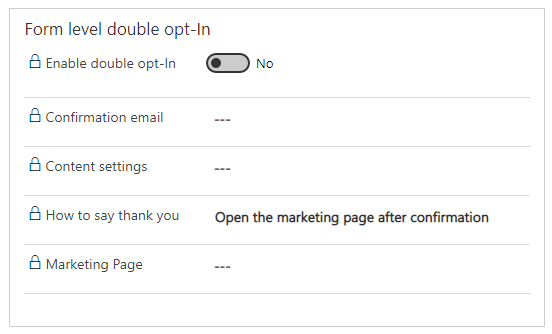
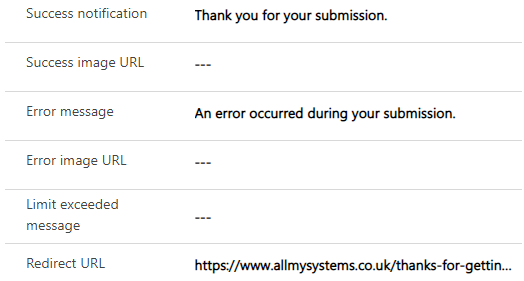
- Embed the form on your website. You’ll find the code on the form page for your marketing form
Write your welcome email
- First create a Marketing email
- Use your existing template or create a new one. There’s a full guide in the Microsoft Documentation
- Your welcome email could contain
- An overview of your company and some useful content which the customer may have not yet seen.
- Your USPs
- An introduction to your products
- A video message
- Offers
- A survey
- This is your best chance to impress and start a long relationship. Take time to craft a great email and be generous
Automate sending the email
- In Dynamics 365 Marketing, create a new Customer Journey to send the email.
- Set your audience as source type = submitted a form and then choose the form you previously created
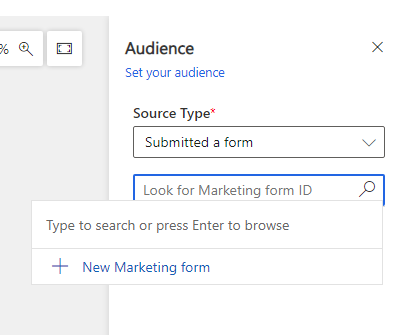
- Add your email you previously created to the journey
Now all people who complete the sign up form will receive your welcome email
Want more ideas?
- You could check that this is only sent to new contacts to make sure no existing contacts receive the email
- Add steps in your customer journey to react to people who click links on your email. You could send them a second email, or schedule a call with your sales team
- Improve your customer journey to include a series of emails over a period of time
- Send users an automated happy birthday email
- Personalise the email
What’s Next?
Take a look at all our Dynamics Marketing articles
Contact us about installing Dynamics 365 Marketing