


Microsoft Dynamics and many other CRMs use grids to display data.
Grids are a convenient way of listing many records on one page. A grid in a CRM system would be recognisable to anyone who has ever used a spreadsheet program like Microsoft Excel.
There are limits to the grids included with Microsoft Dynamics 365. We’ve tried to improve that.
Here’s a standard grid showing activity records
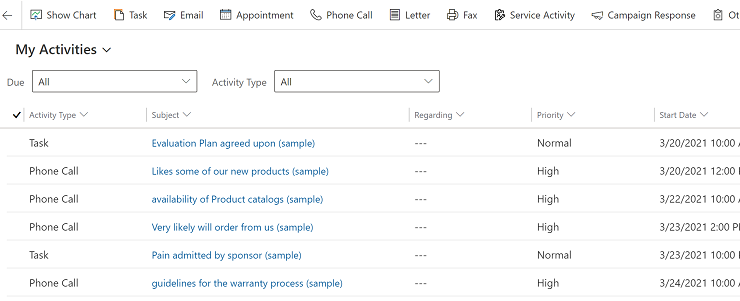
As well as being a great way to view data, it’s also very convenient if you can edit record fields directly in the grid – just like Excel.
Before 2016, Dynamics 365 or Dynamics CRM as it was then, had read only grids as a standard. As regular users you’d have to open each record separately and then load the record list again, every time you wanted to make an edit. Often this meant that importing changes would be a faster option, but with the potential data loss, not without its problems.
What is an editable grid in Dynamics 365?
In the December 2016 release of Dynamics, editable grids were introduced. They were easy to implement and allowed users to edit some data directly in a grid, rather than open each record individually.

What do editable grids allow?
- Direct editing of values in a cell, like Excel
- They support lookup fields
- Records can be
- Sorted
- Filtered
- Grouped
- Columns can be reordered by drag-dropping
How do I switch to an editable grid in Dynamics?
First, you’ll need to enable editable grids for each entity you wish
Now, when you’re viewing a list in that entity, simply choose Show As from the command bar
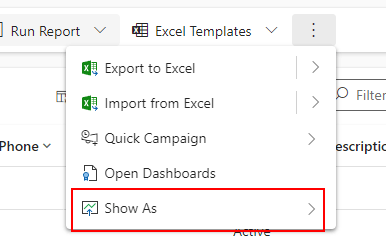
You’ll be able to switch between the standard grid (Read only grid) and the editable grid
Limitations of editable grids in Dynamics 365
- Pagination is slow – every time you load a new page, new records are loaded.
- Bulk actions are difficult.
- Grouping and filtering are slow and clumsy
- Some data types aren’t editable, like composite fields such as Name or Status
- Calculated and rollup fields are not supported
- Doesn’t work on all data types
- Filtering and sorting is not saved between sessions
A better editable grid
It’s possible to improve the standard editable grid in Dynamics.
We’ve spent a lot of time working on the integration and we’ve now launched a better editable grid – AMS Grid
It’s a replacement for the Dynamics editable grid, and contains many more features.
It’s like an application within an application.


What’s so good about this editable grid?
- It’s fast! Very fast. It can quickly load in 10,000s of records and scroll through them with no delay. So much easier than the Dynamics standard editable grid
- Filtering is immediate as you type.
- There are loads of power options like you’d expect from Excel
- Easy to use filters
- Drag drop grouping
- Drag drop column ordering
- Fill down like Excel
- Fast charting
- Handles currency, Yes/No, rating. All sorts of field types
- Supports lookup fields
- Conditional formatting
- Copy/Paste/export to/from Excel
Comparing AMS Grid to the standard grid
| Standard Dynamics 365 editable grid limitation | How AMS Grid solves it |
|---|---|
| Paging is slow. Every time you load a new page, a fresh batch of records is loaded, so moving through a large list is sluggish. | Loads 10,000+ records on a single screen with no paging. You scroll through the full list with no reloading and no lag. |
| Bulk actions are difficult. Editing multiple records means opening each one in turn, or exporting to Excel and re-importing. | Bulk update directly in the grid. Edit many records at once with inline editing and fill-down columns, saved straight back to Dynamics. No export, no re-import. |
| Grouping and filtering are slow and clumsy. | Instant filtering as you type, with drag-and-drop grouping and multi-level sorting, with no performance loss. |
| Some field types can’t be edited, including composite fields such as Name and Status, and it doesn’t work on all data types. | Edit lookups, text, numbers, dates, currency and Yes/No fields in place. |
| Filtering and sorting aren’t saved between sessions, so users redo their view every time they return. | Your filters, grouping and scroll position are retained, including when you open a record and come back. Users can also save their own column layouts and restore them at will. |
If you’re interested in this solution, take a look at how we’ve implemented it to speed up quoting, or contact us for more information about how it can help your system.
Example uses
- Bulk updating of Contacts
- Product line chooser
- Estimate builder
- Task list builder
- Quote builder
