


If you’re running your business across 5, 10, or 15 different systems and spreadsheets, you’re probably wasting hours on duplicated data entry and getting unreliable reports as a result. The fix isn’t another system. It’s fewer systems. Most UK SMEs can get down to two or three, with a proper business platform like Microsoft Dynamics 365 doing the heavy lifting.
So you’ve assessed whether your data is good, bad or downright ugly. Hopefully you’re heading towards the good data league or are there already!
Where do you go from good data?

Introducing the Great Data League…
Why does reducing the number of systems in your business matter?
How do you actually get there?
The Great Data League is about simplifying the systems in your business. It’s about breaking free of the habit of adding more systems and more complexity. It’s about bending the capabilities of a world class business system to give you a proper competitive edge.
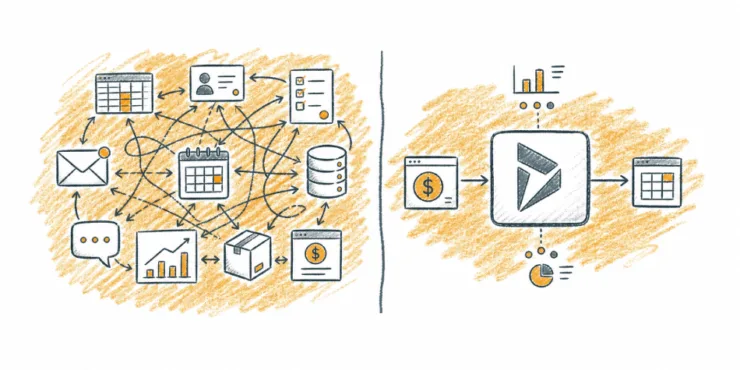
Let’s rewind a little. You’re in the Good Data League and enjoying consistently good reports and data quality.
Why should you cut back to fewer systems?
I’m talking about:
- the multiple spreadsheets for contacts, orders, invoices and contract renewals
- that forgotten CRM system that only you use, while your team quietly ignores it
- the task management system you signed up to in a rush to organise your team’s workloads
So, quickly take a pen and paper, and jot down the number of systems you use.
Finished?
How many do you have? 5, 10, 15… more?
Don’t worry, it’s normal for this to happen as you grow your business. We see it all the time.
Every extra system in your business brings more data duplication. Every piece duplicated data needs more maintenance. When you have a field for company name spread across 8 systems, it needs updating 8 times. That’s not just annoying, it’s expensive. Research from Experian Data Quality shows that inaccurate data has a direct impact on the bottom line of 88% of companies, with the average company losing 12% of its revenue due to bad data.
And it’s not just about wasted time. Under the UK GDPR, personal data must be “accurate and, where necessary, kept up to date” with “every reasonable step” taken to erase or correct inaccurate data without delay. If your customer records are scattered across a dozen systems, keeping them accurate isn’t just difficult, it’s a compliance risk. Infringements of the basic data protection principles are subject to the highest tier of administrative fines, which could mean a fine of up to £17.5 million, or 4% of your total worldwide annual turnover.
Getting in the Great Data League is about using the right system that lets you grow your business.
Now you’ve addressed data quality and timeliness, you need to slim down to use only two or three systems (one system can be unrealistic). Often this is your finance system, plus a professional business solution such as Microsoft Dynamics 365.
Microsoft Dynamics 365 transforms your business to become a Great Data League player. You get to join the club of business owners who are serious about growing their business. Once you are part of the club, you’ll look back and wonder how you managed without it.
What does it look like when you’re ready?
Here are seven traits that business owners like you display when they are ready for the Great Data League:
- You’re fed up of data being duplicated everywhere. Dynamics 365 uses a single database, so one record means one record.
- You want Outlook, Excel and Word to actually talk to your database. Dynamics 365 integrates natively with the full Microsoft stack. It was built by Microsoft, after all.
- You want to capture more data about your customers when you need to. You can add new fields to Dynamics 365 yourself. No waiting for your software provider’s next release.
- You want data entry forms tailored to specific job roles. This improves efficiency and makes training far simpler. Dynamics 365 lets you create role-specific forms.
- You want customer data, contract renewals and invoices accessible anywhere. The Dynamics 365 mobile app lets you browse your data from any device, wherever you are.
- You want the system to flag data problems before they snowball. Dynamics 365 includes built-in duplicate detection rules that catch issues like duplicate records as they’re created.
- You want proper visual dashboards to spot problems fast. Dynamics 365 gives you charts and dashboards out of the box so you can keep your data clean and stay in the Great Data League.
What happens when you don’t act?
It’s worth being honest about the cost of doing nothing. Every month you keep running on 10+ systems, you’re paying for it in duplicated effort, unreliable reports and frustrated staff. Your team’s spending time on data entry instead of the work that actually grows your business.
And it gets harder over time, not easier. The more data you accumulate across more systems, the messier the eventual clean-up becomes. If you’re already feeling the pain, that’s actually a good sign. It means you’re ready.
How do you get started without a massive project?
You don’t need a grand transformation programme. You don’t need to rip everything out overnight. Most of the businesses we work with start by mapping out the systems they’re currently using (your pen and paper list from earlier), then working out which ones can be retired once Dynamics 365 is in place.
We usually start with a tailored demo using your own data, so you can see exactly what it would look like for your business. No slides. No hypotheticals. Just your data, in the system.
From there, it’s a phased approach. We pick the biggest pain point, get that working well, and build from there. Small steps, real results.
FAQs
Most UK SMEs can realistically get down to two or three core systems. Typically that’s your finance system plus a business platform like Microsoft Dynamics 365. One system for everything is rarely practical, but 10+ is almost always too many.
The biggest costs are duplicated data entry, unreliable reporting and wasted staff time. Research suggests the average company loses around 12% of its revenue due to bad data. There’s also a GDPR compliance risk if customer records are scattered across multiple systems and aren’t kept accurate.
In most cases, yes. Dynamics 365 can handle contacts, orders, invoicing, contract renewals, task management and reporting in a single database. You’ll probably still keep your finance system alongside it, but many of the standalone tools and spreadsheets can go.
It depends on how many systems you’re replacing and how complex your data is. A typical project for a UK SME takes a few weeks to a few months. We usually start with the biggest pain point and phase the rest in gradually.
This is the question that keeps most business owners up at night. The honest answer is: they will if it’s set up properly. Dynamics 365 lets you create role-specific forms so each person only sees what they need. And because it integrates with Outlook, Excel and Word, your team can work in tools they already know.
Ideally yes, but we can help with that. Data migration is part of what we do, and it includes identifying duplicates, cleaning up records and making sure everything goes into the new system in good shape.

