


Dynamics 365 Migrations
Thinking About Moving from QuickBooks to Business Central?
Tired of workarounds, month-end marathons and five spreadsheets held together with hope?
If you’re considering the switch, this will help you decide if it’s the right move and what you need to do to make it work
Mark Pullar, CEO


Why do businesses leave QuickBooks?
Companies don’t leave QuickBooks because they want new software.
They leave because:
Reporting takes too long (and still doesn’t feel right)
Spreadsheets are everywhere
Leadership doesn’t trust the numbers anymore
Inventory doesn’t match reality
QuickBooks isn't bad
It’s just not right for all businesses at all times
QuickBooks is brilliant for early-stage businesses.
It’s simple, affordable and it does what it says
Things start to go wrong in QuickBooks when
- You're running multiple entities or locations
- You need inventory, project management, or CRM alongside finance
- Month-end takes days, not hours
- Your team is living in Excel because QuickBooks can't report the way they need
- You're copy-pasting data between systems and hoping nothing breaks
Answering your questions

A Business Central migration isn’t just a software upgrade
- It changes how your finance team works, how your data flows, how your reports are built, and in many cases, how your entire business operates.
- Done right, it creates clarity and control.
- Done poorly, it creates months of confusion, delays, and costly rework.
Is Business Central right for you?
Consider Business Central if:
- You've got 5+ users who need more than just accounting
- You're already in the Microsoft world (Outlook, Teams, Excel)
- You're growing and QuickBooks is bending under the weight
- You need reporting you can trust
You shouldn't move to Business Central if:
- You only need basic bookkeeping
- Your processes are still simple
- You don’t have internal ownership for the project
- You’re hoping software alone will fix broken operations

Is Microsoft Dynamics 365 Business Central better than QuickBooks?
Comparing QuickBooks and Business Central
| Feature | QuickBooks Online | Business Central |
|---|---|---|
| Built-in reports | Standard set of profit & loss, balance sheet, VAT, aged debtors/creditors. Customisable to a point. | Extensive built-in reports across finance, sales, purchasing, inventory, and projects. Much deeper out of the box. |
| Custom reports | Available on Advanced plan only. Limited formatting and layout control. | Fully customisable. Build your own financial reports (account schedules), column layouts, and row definitions. |
| Dashboards | Basic dashboard on the home screen. KPI tracking on Advanced plan. | Real-time role-based dashboards. Warehouse and inventory data immediately reflected in accounting, sales, and purchasing information. |
| Basic inventory | Available on Plus and Advanced plans. Track quantities and cost of goods sold. FIFO costing. | Full inventory management with multiple costing methods: FIFO, LIFO, average, standard, and specific. |
| Warehouse management | None. You'd need a separate system or spreadsheets. | Full warehouse management, from receiving and storing items in bins to picking and shipping orders. Includes bin management, directed put-away, and pick instructions. |
| Multiple companies | Does not natively support multi-entity or consolidated accounting within a single company file. Each entity needs a separate company file with its own subscription. | Native multi-company support. Set up and manage multiple companies within a single Business Central environment. Switch between them instantly. |
| Consolidation | Multi-entity reporting available in QuickBooks Online Accountant only. Not available to regular users inside their own QuickBooks. | Built-in consolidation features. Combine financials across multiple companies, including currency translation. Available to all users with the right permissions. |
| Intercompany transactions | Manual. Maintaining separate accounts for each company makes intercompany transactions difficult and time-consuming. | Automated intercompany transactions. Post a sale in one company and the corresponding purchase is created in the other. |
| Microsoft 365 integration | No native integration. Third-party add-ins needed. | Deep native integration. |
| MTD for VAT | Recognised by HMRC for MTD. Prepare and submit VAT returns electronically from within QuickBooks. | On HMRC's list of MTD-compatible software. Built-in HMRC VAT Setup service connection for direct submission. |
| Digital record keeping | Digital records maintained within QuickBooks. Meets the basic requirement. | All financial data stored digitally as standard. The requirement is inherently met. |
| VAT return submission | Direct submission to HMRC from within QuickBooks. | Direct submission to HMRC via built-in service connection. |
Our technical architects are here to help. No pushy sales pitch. Just answers
What Happens During a Migration
How things typically work in a Dynamics migration:
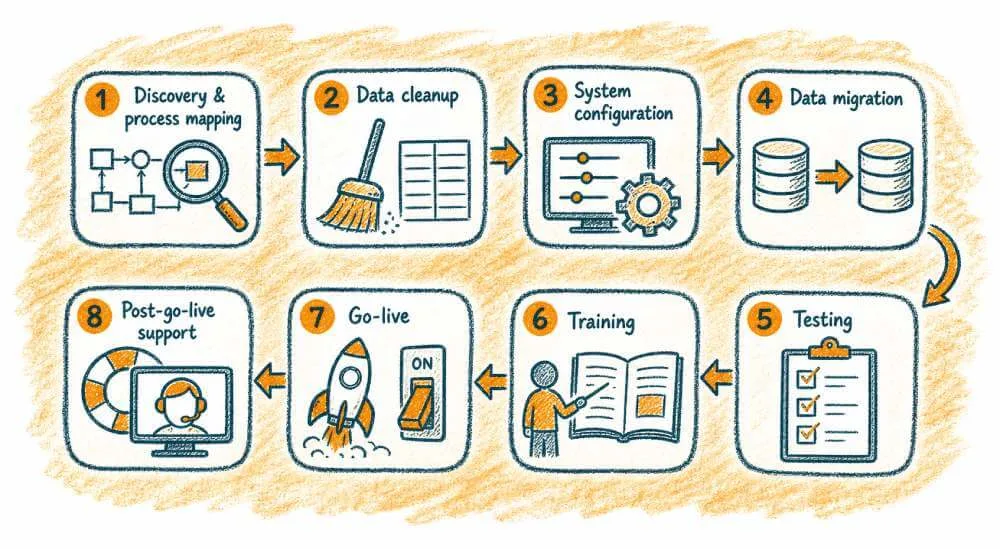
Discovery & process mapping ▶️ Data cleanup ▶️ System
configuration ▶️ Data migration ▶️ Testing ▶️ Training ▶️ Go-live ▶️ Post-go-live support
How much does a migration cost?
Typical ranges
Simple finance migration:
£8k–£30k
Finance + inventory
£15k–£60k
Complex operations (manufacturing/distribution):
£60k–£120k+
Costs Include
- Software licensing
- Implementation
- Data migration
- Ongoing support
- Training
Hidden costs - easy to miss
- Internal staff time
- Process redesign
- Change management
- Rebuilding reports
The biggest cost is rarely the software, it’s the business change.
How long do QuickBooks to Dynamics migrations take?
Small Projects
1-3 months
Mid-size
3-6 months
Complex
6-12+ months
What we've heard after migrations
We didn’t realise how broken our processes were until we tried to map them
Training took longer than expected
The system is powerful, but only if we use it properly
We wish we cleaned our data earlier
Looking to integrate Dynamics and QuickBooks instead?

Why All My Systems?
Because software alone doesn’t transform a business – people do.

We’re an established UK-based Microsoft partner helping organisations like yours simplify operations, give power to your teams and delight customers.
- Small, senior team. You’ll know our names
- Straight talk. If it’s not right, we’ll say
We’ve seen what happens when a great business system meets a team that truly cares. The result? Growth that sticks.

A trusted Microsoft partner for growing UK businesses
All My Systems are an experienced supplier of full-cycle, user-focused Business Central solutions.
The Questions Holding You Back
Every buyer has a few doubts before committing.
Instead of hiding from them, we tackle them head-on.
Here’s our answers to the most common concerns we hear:
Do I need to migrate all my data from QuickBooks?
Not always.
At a minimum, most businesses migrate:
- Customers and suppliers
- Open balances (what’s still owed or payable)
- Key items or products
Some historical data may be left behind, especially if it’s no longer needed day-to-day.
The important part isn’t volume.
It’s making sure what does come across is accurate and usable.
Do I have to change how my processes work?
Not straight away.
A lot of businesses start with a like-for-like setup:
- Same process
- Same flow
- Just in a different system
That makes testing easier and reduces risk.
Once things are stable, you can improve and automate gradually.
Trying to redesign everything during migration usually slows things down.
How does banking work in Business Central?
It depends on your setup.
In general, you’ve got two options:
- Import bank transactions (for example using CSV files)
- Use a bank feed or extension for automation
If you’re already importing in QuickBooks, the process is often very similar to start with.
Automation can come later if needed.
How is VAT handled in Business Central?
Business Central can handle VAT directly within the system.
That includes:
- Calculating VAT on transactions
- Producing VAT returns
- Supporting Making Tax Digital submissions
Some businesses still lean on their accountants to review before submission. That’s fine.
The key thing is getting VAT set up properly from the start.
If the setup is wrong, everything downstream is affected.
What happens after we go live?
Go-live isn’t the end. It’s the start of the real world.
Most businesses need ongoing support for:
- Fixing small issues that appear under real usage
- Answering “how do we do this?” questions
- Training new users
- Making gradual improvements
Without that support, teams often fall back into old habits or workarounds.
Can we reuse the setup for another company or entity?
Usually, yes. to a degree.
If your businesses operate in a similar way, you can reuse:
- Core configuration
- Processes
- Reporting structure
You’ll still need to adjust for things like:
- VAT rules
- Currency
- Local requirements
But it’s normally faster and cheaper than starting again from scratch.
Can we keep using Excel alongside Business Central?
Is Business Central overkill for a small business?
What if our team hates it and won't use it?

Do you have questions about migrating?
or just want to get in touch?
Tell us your size and current system and we’ll send a ballpark cost
Our technical architects are here to help.
No pushy sales pitch, just answers.
Or call us on 01422 824831
email: hello@allmysystems.co.uk