


AMS BANK TRANSACTIONS
Import bank statements into Business Central. Automatically.
Setup takes about 30 minutes. No bank install. No coding.
No more slow, manual uploading of bank statements
Still importing bank statements one by one?
AMS Bank Transactions fixes that. It runs quietly in the background, pulls your bank data in on a schedule, and drops everything straight onto your reconciliation page, ready to process.

No more manual uploads to Business Central
How does it help my business?
Saves admin time
Every manual upload is a risk. Wrong file. Wrong account. Duplicated lines. AMS Bank Transactions removes all of that. Your team stops touching it. The data just appears. Most customers save 3-4 hours per week
Greater accuracy
Remove the risks associated with manual entry
Better data in Business Central
Because statements come in on a schedule, your bank data in Business Central stays current. Better data means better cashflow visibility, more accurate forecasting, and month-end that doesn't feel like a crisis.
Grows with you
One bank account or ten. One currency or several. The setup handles it. No extra admin as your business scales.
"We used to spend 7 a week on bank uploads. Now it just happens"
Finance Manager from one of our large manufacturing customers
How does AMS Bank Transactions work?
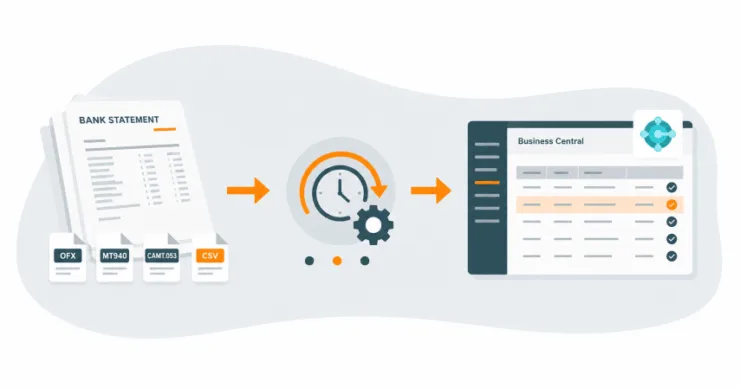
Most Business Central users import bank statements by hand. Download the file, log into BC, upload, repeat, for every account, every time. AMS Bank Transactions replaces all of that with a scheduled, automated process that needs no human involvement once it’s running.
First, install the Business Central extension – it’s easy. Then you’re ready to set up the add-on and begin to process bank statements
- When you receive a statement, its contents are read and processed by our system
- Next the data is uploaded to a secure, currency specific, Azure storage container
- On a regular schedule, the statement is imported and processed using our customer job schedulers
- All your statement lines appear on the reconciliation page on their correct currency page, ready for processing.

AMS Bank Transactions
- 30 minutes setup - no complex bank install
- Simple to use interface
- Supports multiple accounts
- Multiple currencies
- Compatible with all bank statement types


Why All My Systems?
Because software alone doesn’t transform a business – people do.

We’re a UK-based Microsoft partner helping organisations like yours simplify operations, empower teams and delight customers.
We’ve seen what happens when a great business system meets a team that truly cares. The result? Growth that sticks.
Is it right for me?
You can use AMS Bank Transactions on the Essential and Premium edition of Microsoft Dynamics 365 Business Central.
No, the extension is simple to use and requires little or no intervention. Set up is a one off task.
Licencing is dependent on the number of users you have
Please get in touch and we’ll give you a quick cost estimate for your company
Yes, we have a support department which can be used for issues, training and modifications.
Not out of the box, no. The standard version of Business Central requires you to download a statement file from your bank and upload it manually, every time, for every account. AMS Bank Transactions removes that entirely. Once it’s set up, the import runs on a schedule with no human involvement.
It supports all the common formats: OFX, MT940, CAMT.053, CSV, and PDF. So whether your bank exports a structured data file or a standard PDF statement, it’ll work. If you’re not sure what format your bank uses, just ask us and we’ll check for you.
Yes. Statement data is uploaded to a secure, currency-specific Azure storage container. It doesn’t sit in an email inbox or on a shared drive. It moves directly from your bank statement into Business Central via Azure, and nowhere else.
Find out more about automatic bank statement uploads
Fill out the form and we’ll get in touch for a chat.
No obligation and No hard sell.
Or call us to book on 01422 824831
email: hello@allmysystems.co.uk